
No products in the cart.
APPLICATION · System Integrator Guide
Building a Vision AI Waste Bin Monitoring System — Architecture, Hardware & Integration Guide
You’ve been briefed on a smart bin monitoring project. This guide covers what the full system actually looks like when built on open edge AI hardware: how on-device inference replaces cloud dependency, what the NE301-to-backend data flow looks like end-to-end, how to scope hardware for different site types, and what a realistic 8-week PoC-to-production timeline looks like.
What You’re Actually Being Asked to Build
A typical smart bin monitoring brief lands like this: a facility manager or city operations team wants to know which bins need collection before they overflow, without increasing collection frequency across the board. The implied ask is a monitoring system that generates reliable fill-level data and feeds it into an alerting or routing workflow.
The default hardware assumption in most briefs is ultrasonic fill sensors. They’re cheap, well-understood, and have a decade of deployment history. The problem is that ultrasonic sensors produce a single distance value, average 60–75% accuracy in mixed-waste environments, and cannot detect external overflow, contamination, or abnormal conditions. At scale, their noise floor degrades routing optimisation to the point where operators revert to fixed schedules — defeating the purpose of the system.
A Vision AI approach — specifically, on-device inference running on an edge AI camera — changes the data quality, integration architecture, and long-term cost structure of the whole system. This guide explains how to build it.
60–75%
Ultrasonic fill accuracy in mixed-waste environments (IoT Analytics 2023)
>90%
Vision AI classification accuracy with YOLOv8 on NE301 Neural-ART NPU
$0
Recurring cloud inference cost — NE301 runs the model entirely on-device
Scope of This Guide
This article covers system architecture, hardware selection, deployment scenarios, and implementation roadmap. For a detailed comparison of ultrasonic sensors vs. Vision AI — including accuracy benchmarks, MQTT payload structure, and YOLOv8 training code — see Why Ultrasonic Sensors Fall Short.
How the System Works: End-to-End Architecture
The core architectural difference between a Vision AI system and a sensor-based system is where the intelligence lives. In a sensor system, the backend has to interpret raw scalar data and make classification decisions with incomplete information. In a Vision AI system, the camera itself classifies — the backend only receives structured results.
The NeoEyes NE301 uses an STM32N6 processor with a Neural-ART NPU (Neural Processing Unit — a
dedicated AI inference accelerator). The camera captures a frame, runs the trained classification model on the
NPU in under 50ms, and publishes the result as a structured MQTT or HTTP payload. No
image leaves the device unless your backend explicitly requests it. No cloud round-trip. No per-inference fee.
End-to-End Data Flow — NE301 Waste Bin Monitoring System
1
NE301 Camera
On-device inference
<50ms · IP67
<50ms · IP67
→
MQTT / HTTP
2
Network Layer
WiFi 6
LTE 4G / PoE (optional)
LTE 4G / PoE (optional)
→
JSON payload
3
MQTT Broker
Your infra
or NeoMind
or NeoMind
→
subscribe
4
Backend / Platform
Alert rules
Dashboard · SLA log
Dashboard · SLA log
→
webhook / API
5
Dispatch
Demand-driven
collection trigger
collection trigger
What Each Node Does — and What You Own
Steps 1–2 are hardware: the NE301 and its connectivity. Steps 3–5 are your integration surface. The MQTT broker can be self-hosted or the NeoMind Edge AI agent platform. The backend can be anything that subscribes to an MQTT topic — Home Assistant, a custom API endpoint, an enterprise SCADA system, or a route planning platform. TherUrban Public Bins e is no mandatory proprietary middleware.
Each NE301 payload includes: fill class, confidence score, estimated fill percentage, device ID, timestamp, and an optional image URL pointing to the on-device stored frame. Battery level and signal strength are included in every message, giving you passive fleet health monitoring at no additional cost.
🛠 Integration Starting Point
The NE301 MQTT topic structure, payload schema, QoS settings, and broker configuration are documented in the MQTT Data Interaction guide on Wiki. A complete working example — NE301 to Home Assistant via MQTT — is available in the Urban Waste Bin Overflow Monitoring case study.
Deployment Scenarios: Where This System Fits
The same NE301 hardware and model pipeline adapts to substantially different deployment contexts. The constraints that differ between scenarios are power availability, connectivity, bin density, and required classification granularity — not the core architecture.
Urban Public Bins
High-traffic street bins at transit hubs, commercial districts, and parks. LTE Cat.1
connectivity allows deployment without existing WiFi infrastructure. Deep-sleep mode (7–8 µA) enables months
of battery operation per charge. Mount on bin body or adjacent pole — no civil works required.
NE301 standalone · LTE · battery
Commercial & Retail Properties
Shopping malls, food courts, and office parks with predictable but uneven waste patterns
tied to trading hours. WiFi infrastructure typically available. Camera covers waste rooms, loading docks, or
back-of-house collection points. Overflow data feeds into facility management workflows and contracted
collection scheduling.
NE301 standalone · WiFi 6 / PoE
Industrial & Manufacturing
Production lines generate process waste in irregular bursts. Bin overflow is a safety and
compliance issue, not just a cleanliness one. NE301’s IP67 enclosure handles dust, humidity, and vibration.
MQTT integration connects directly with existing SCADA or MES systems without proprietary middleware.
NE301 · IP67 · MQTT → SCADA
Multi-Stream Recycling Stations
A single NE301 with a model trained on multiple waste classes — general waste, paper,
glass, plastic — monitors a full recycling cluster. Type-specific collection alerts and contamination
tracking are defined at the model level, not through separate sensors per stream.
NE301 · custom multi-class model
Campuses, Hospitals & Airports
Dense bin networks across zones with very different usage intensities. A NeoEdge NG4500
edge server aggregates feeds from 10–50 NE301 cameras across the facility, enabling campus-wide dashboards,
automated work-order generation, and VLM-level anomaly analysis from a single compute node.
NE301 network + NG4500 hub
Remote & Low-Infrastructure Sites
Parks, nature reserves, construction sites, and rural facilities where power and network
access are limited. With flexible connectivity options such as WiFi and optional LTE, NE301 supports remote
deployments without relying on fixed infrastructure. Combined with a solar panel and battery system, it can
operate continuously in off-grid environments with minimal maintenance requirements.
NE301 · WiFi / LTE 4G · solar
Hardware Selection: Matching Products to Site Requirements
The right hardware configuration depends on three variables: inference requirements (does each unit need to classify independently, or can classification be centralised?), power availability (mains, PoE, battery, or solar?), and network scale (standalone units or a multi-camera fleet requiring central management?).
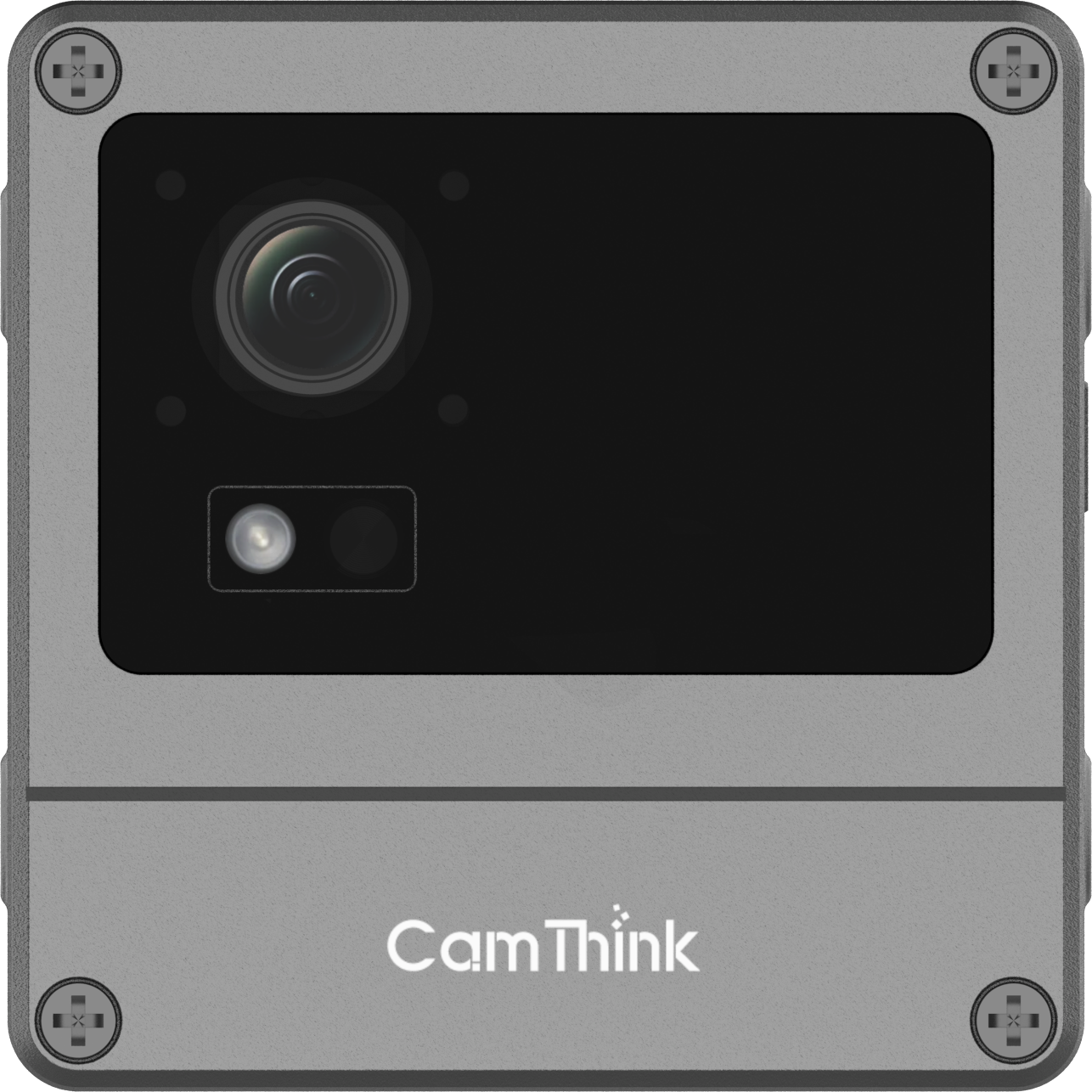
NeoEyes NE301
Primary Node · On-Device AI
On-device inference — no server needed per bin
- STM32N6 + Neural-ART NPU · 0.6 TOPS
- YOLOv8 native · <50ms inference latency
- 4MP MIPI CSI · 51°/88°/137° FOV options
- Deep sleep 7–8 µA · PoE, USB, or battery
- IP67 weatherproof · 77×77×48 mm
- WiFi 6 · BT 5.4 · optional LTE 4G / PoE
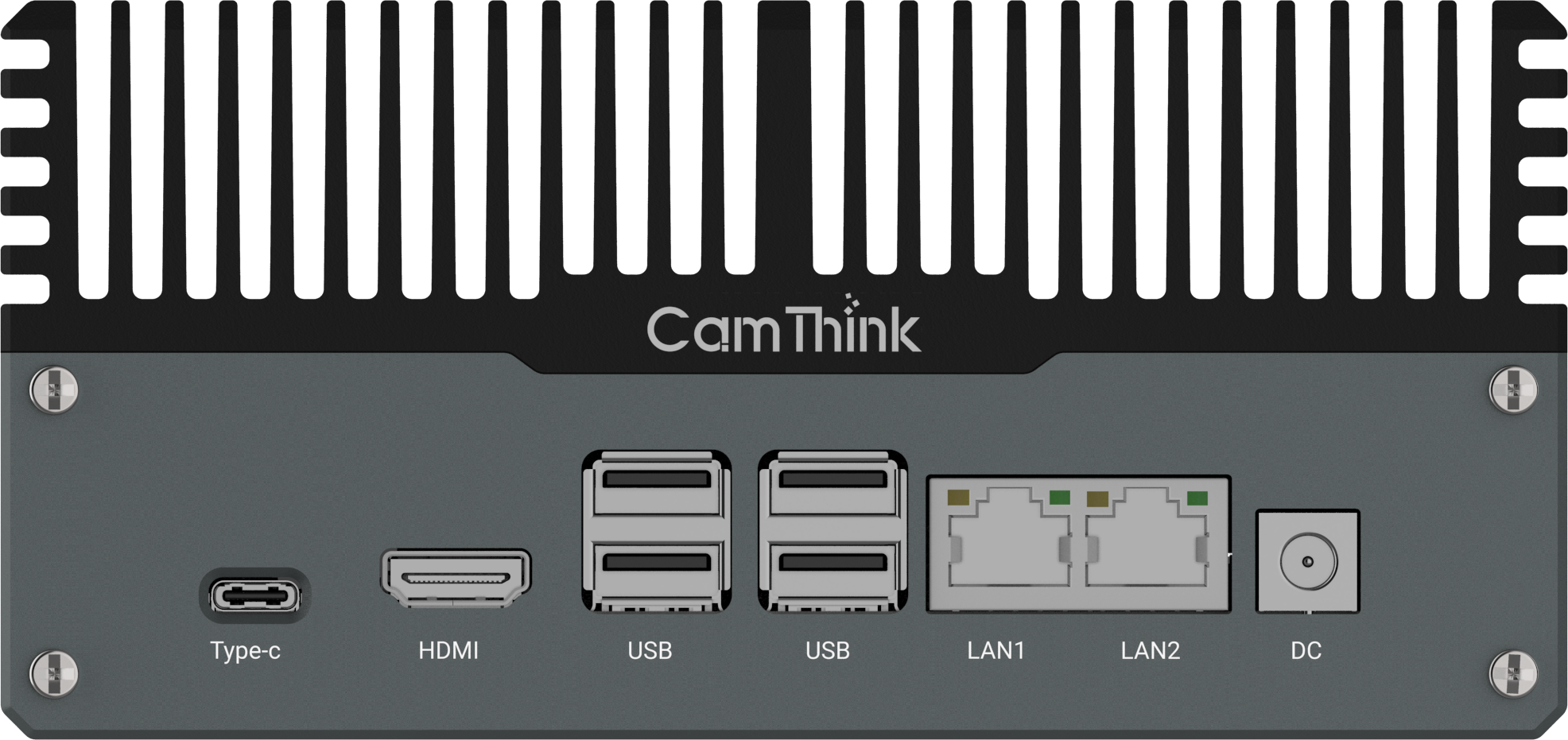
NeoEdge NG4500
Edge Server · Multi-Camera Hub
Centralised inference for large-scale networks
- NVIDIA Jetson Orin NX/Nano · up to 157 TOPS
- Aggregates feeds from multiple NE301 cameras
- JetPack 6.0+ · VLM / LLM support
- Fanless chassis · 12–36V DC
- CAN · RS232 · RS485 · multi I/O
- Runs mainstream deep learning frameworks
Architecture Decision Rule
NE301 standalone is suitable for distributed deployments where each camera performs on-device inference and
publishes results independently via MQTT.
Add a NG4500 when centralised model management, cross-camera coordination, or integration with industrial
I/O systems is required.
5-Dimension Framework for Evaluating Any Smart Bin Solution
Before committing a hardware budget, evaluate any smart bin monitoring solution across these five dimensions. The right answer differs by site type — but being explicit about each prevents expensive mismatches between hardware capability and operational requirements.
1
Inference Location
On-device inference runs directly on the camera — no cloud latency, no per-inference
fee, and continues operating during network outages.
NE301 performs real-time inference on the Neural-ART NPU in <50 ms.
Cloud-based vision typically requires data round-trips and introduces latency and recurring costs at scale.
2
Power Architecture
Mains power simplifies deployment but limits flexibility.
Battery or solar setups require ultra-low power consumption.
NE301 draws 7–8 µA in deep sleep, enabling months of operation in event-triggered mode.
PoE variant simplifies fixed deployments with a single cable for power and data.
PoE variant simplifies fixed deployments with a single cable for power and data.
3
Model Flexibility
Fixed-model systems cannot adapt to diverse scenarios. NE301 supports a
fully open model pipeline:
define classes, train on your data, quantise to INT8, and deploy via Web UI or OTA.
No proprietary toolchain required.
No proprietary toolchain required.
4
Integration Protocol
Native MQTT and HTTP supportenables integration with SCADA, BMS,
Home Assistant, or custom backends.
No vendor lock-in, no middleware required.
Proprietary systems typically depend on dedicated gateways and cloud subscriptions.
Proprietary systems typically depend on dedicated gateways and cloud subscriptions.
5
Total Cost of Ownership
One-time hardware cost with no recurring fees fundamentally changes the 3-year TCO.
NE301 starts at $199.90 per unit with zero per-inference
cost.
In contrast, a $5/unit/month SaaS model adds up to ~$60,000 over three years at 100 units — excluding operational savings.
In contrast, a $5/unit/month SaaS model adds up to ~$60,000 over three years at 100 units — excluding operational savings.
Implementation Roadmap: PoC to Production in 8–12 Weeks
The phased approach below reflects how integration partners have moved from first prototype to production system. The timeline assumes a single-site deployment of 10–50 NE301 units with WiFi or LTE connectivity.
1
Week 1–2
Hardware Setup & Network Configuration
Mount NE301 units at target bin locations. Configure WiFi or LTE connectivity
via the browser-based Web UI — no firmware development needed at this stage. Verify MQTT broker
connection, test default image capture pipeline, and confirm payload delivery to your backend. First
working data flow is typically achieved within two days of hardware arrival.
2
Week 2–4
Data Collection, Annotation & Model Training
Use the CamThink AI Tool Stack to capture images from deployed devices
across real conditions — including varying lighting, weather, and waste types. Annotate fill-level classes
(Empty / Partial / Near-Full / Full / Overflow / Contaminated), train a YOLOv8 model, and export INT8
quantised for the Neural-ART NPU. Minimum viable dataset: 200–400 images per class. Deliberately
over-represent
overflow and contaminated — these are rare in real operation but
highest operational priority.3
Week 4–5
Model Deployment & Threshold Validation
Upload the quantised
.bin model package to each NE301 via Web UI
or OTA push. Run validation captures across representative conditions. Set confidence thresholds per class
— recommend ≥ 0.80 for overflow and contaminated dispatch triggers,
≥ 0.75 for full. Log all low-confidence payloads: they become your retraining
dataset for the next iteration.
4
Week 5–7
Backend Integration & Alerting Rules
Connect the MQTT data stream to your target platform: Home Assistant, a custom
API endpoint, or enterprise fleet management software. Configure automation rules — dispatch alerts when
confidence-weighted fill status crosses threshold. Subscribe to
camthink/{client}/bin/# at
the broker to receive all bin events. Use retained messages for last-known state so newly-connected
subscribers have immediate current fill status without waiting for the next inference cycle.
Planning a PoC?
Tell us your bin count, site type, connectivity constraints, and target go-live — we’ll help scope the hardware configuration and model approach.
5
Week 8–12
Scale Rollout & Fleet Management
Replicate the validated configuration across additional sites using the AI Tool
Stack fleet deployment tools. Firmware updates, model pushes, and alert configuration apply to the entire
network without on-site access. Each NE301 reports battery level and signal strength in every MQTT payload
— passive device health monitoring at no additional cost. Track operational KPIs: overflow incidents per
week, collection runs avoided, and dispatch response time to
overflow-class alerts.Solution Comparison: Sensor vs. Cloud vs. Edge AI
The table below compares the four most common approaches to bin fill monitoring across dimensions that matter for a production deployment decision.
| Dimension | Ultrasonic Sensor | Cloud Vision API | NE301 On-Device AI | NE301 + NG4500 |
|---|---|---|---|---|
| Fill accuracy (mixed waste) | ~68% | >90% | >90% | >90% |
| Overflow / external detection | No | Model-dependent | Yes (train class) | Yes + VLM analysis |
| Cloud / internet dependency | Optional | Always required | Not required | Not required |
| Recurring cost per device | Low | API fee per call | $0 after hardware | $0 inference cost |
| MQTT / HTTP native | Vendor-specific | API only | Yes — open protocol | Yes — open protocol |
| Open model pipeline | Not possible | Provider-dependent | Fully open · YOLOv8 | Fully open · VLM/LLM |
| Best for scale | <50 bins, simple | Low-volume, high-accuracy | 1–50 bins per site | 50+ cameras, enterprise |
| Est. TCO · 100 units · 3 yr | $6–18K HW only | $0 HW + ongoing API | ~$20K HW · zero recurring | Contact for fleet pricing |
When the Standard Model Pipeline Isn’t Enough
The NE301’s open model pipeline covers the majority of waste bin monitoring scenarios: collect images, annotate, train YOLOv8, export INT8, deploy. For most deployments, an in-house team or an integration partner can complete this in the Week 2–4 window described above.
There are cases where the standard pipeline hits real limits. Unusual waste stream compositions — specialist industrial waste, high-contamination mixed streams, regulatory waste classes requiring precise identification — need more training data, domain-specific annotation expertise, and often multiple training iterations to achieve reliable production accuracy. If your project has no in-house AI team or a tight delivery deadline, this is where CamThink’s algorithm customisation service applies.
The service delivers a trained, INT8-quantised model tuned specifically to your bin types, waste profiles, and site conditions. The workflow covers dataset annotation, model training, quantisation, and deployment validation. Typical delivery is 4–6 weeks from dataset submission. The deliverable is a model file that loads directly onto your NE301 fleet — you own it, retrain it, and deploy updates via OTA without further service dependency.
What You Need to Start a Customisation Engagement
A sample of 50–100 labelled images per class from your specific bins and waste types, a description of the deployment environment (indoor/outdoor, lighting, mounting height), and target class definitions. Contact sales@camthink.ai or use the inquiry form to scope the project.
FAQ
Does the NE301 classify bin fill levels on the camera itself, or does it send images to a server?
Classification runs entirely on the NE301’s Neural-ART NPU — no image is sent to a cloud server or external
compute node for inference. The result (fill class, confidence score, timestamp) is produced locally in
under 50ms and published as a structured MQTT or HTTP payload. Images are stored on-device and only
retrieved by your backend if you explicitly request them via the
image_url field in the
payload.
What connectivity options are available for outdoor bins without WiFi infrastructure?
The NE301 supports WiFi 6 and Bluetooth 5.4 as standard. Optional variants add LTE 4G (cellular fallback,
practical for most outdoor locations). The PoE variant uses a
single Ethernet cable for both power and data, which is the preferred option for fixed indoor or
infrastructure installations.
How many NE301 cameras can one NG4500 edge server handle?
It depends on the workload and deployment architecture.
When each NE301 performs on-device inference and only sends events or snapshots, a single NG4500 can aggregate data from dozens of NE301 cameras. If it is used for video streaming or centralised inference, the capacity depends on model size, resolution, and processing requirements. For real-time or video-heavy deployments, we recommend discussing your use case with the CamThink team for architecture guidance.
When each NE301 performs on-device inference and only sends events or snapshots, a single NG4500 can aggregate data from dozens of NE301 cameras. If it is used for video streaming or centralised inference, the capacity depends on model size, resolution, and processing requirements. For real-time or video-heavy deployments, we recommend discussing your use case with the CamThink team for architecture guidance.
Can model updates be pushed to a deployed fleet without on-site visits?
Yes. The NE301 supports OTA firmware and model updates via the NeoMind platform or your own
MQTT-based device management pipeline. Updated model files are pushed in compressed format and applied on
next device restart. For large fleets, you can stage rollouts — deploy to 10% of devices first, validate
accuracy, then push to the full fleet — without any on-site access.
Are captured images stored in the cloud or on CamThink’s servers?
Images are stored on the NE301 itself and are only accessible via the device’s own HTTP endpoint on your
local network. Nothing is forwarded externally unless your backend explicitly fetches the image from the
image_url field in the MQTT payload. There is no mandatory cloud storage, no vendor-side data
retention, and no per-image API call. Your inference data and images stay on your infrastructure.
What’s the difference between this deployment guide and the sensor comparison article?
This article covers system architecture and implementation: how to build a complete waste
monitoring system from hardware to backend integration, including deployment scenarios, hardware selection,
and a week-by-week roadmap. The companion article — Why Ultrasonic Sensors Fall Short — covers the technical case for
Vision AI over sensors in detail: accuracy benchmarks, MQTT payload structure, YOLOv8 training
code, and confidence threshold configuration. Read both if you’re evaluating the approach from scratch; use
this article if you’ve already decided on Vision AI and want to scope the build.
What privacy considerations apply to deploying cameras on public or commercial property?
Because inference runs on-device, no raw video stream needs to leave the camera. The MQTT payload contains
only the classification result, confidence score, and an optional reference to a still image stored
on-device. For public-space deployments, your local privacy regulations (GDPR, CCPA, or equivalent) will
govern whether and how still images may be stored or transmitted. The open firmware and configurable image
retention settings on NE301 give you full control over what data leaves the device — a significant advantage
over cloud-streaming solutions.
🛠 Developer & Integration Resources
Wiki Documentation
NE301 setup, MQTT guide, AI Tool Stack, deployment reference
Waste Bin Overflow Case Study
NE301 → MQTT → Home Assistant — full working example
AI Tool Stack Guide
Dataset → annotation → YOLOv8 training → INT8 export → deploy
MQTT Integration Guide
Topic structure, payload schema, broker configuration
GitHub — CamThink-AI
Open firmware, model examples, MQTT client samples
Discord Community
Ask questions, share builds, get integration help