A practical path from quantized ONNX or TensorFlow Lite to an NE302 package, with model-fit checks, JSON configuration, STM32N6 compilation, fixed-image validation, camera testing, and stage-by-stage troubleshooting.
How Custom Model Deployment Works on NE302
To deploy a custom AI model on NeoEyes NE302, you do not upload a raw ONNX or TensorFlow Lite file and wait for the camera to interpret it. You prepare a quantized model, describe its tensor and postprocessing contract in JSON, compile it through the STM32N6 model toolchain, package the generated binary with its metadata, and then validate that package on the device.
That distinction matters because NE302 is an embedded vision node, not a general-purpose Linux computer. It uses an STM32N6 Cortex-M55 running at 800 MHz with a Neural-ART accelerator rated up to 0.6 TOPS for INT8 workloads. The platform has 4.2 MB of on-chip SRAM and NPU RAM, 32 MB of PSRAM, and 64 MB of SPI flash. Its 4 MP camera input still has to be transformed into the exact tensor the model expects. Operator support, memory placement, preprocessing, and result decoding are therefore part of deployment, not cleanup work after deployment.
If the camera position, optics, power, or board format is still undecided, first review how to add vision AI to an existing device with NE302. This guide starts at the point where the hardware path is defined and a model must be prepared for the device.
A useful mental model is: the source model defines the network, while the NE302 package defines how that network becomes a runnable device component.
Layer
NE302 deployment responsibility
Evidence to keep
Model graph
Quantized ONNX or TFLite that the selected ST Edge AI toolchain can compile
Source file, export settings, operator report
Tensor contract
Input shape and normalization plus output shape, type, scale, and zero point
Matching JSON and tensor inspection
Runtime
Model binary and App built for the same ST Edge AI variant
Build log, firmware version, package version
Application result
Registered postprocessing converts tensors into detections, poses, faces, or segments
Fixed-image result and camera result
Start with Four Model Fit Questions
Teams often begin with the model file size because it is easy to see. File size can help, but it does not tell you whether the graph compiles, whether intermediate tensors fit the memory plan, or whether firmware knows how to decode the output. A smaller model can fail on an unsupported operator. A larger one can sometimes compile successfully with a suitable relocation profile.
1. Does the task have a usable postprocessing path?
The public NE302 repository lists verified paths for specific YOLOv8n and YOLO11n builds used for object detection and multi-person pose estimation, along with verified BlazeFace face detection, ST YOLOX object detection, and YOLOv8 instance segmentation examples. These configurations are practical starting points because the application already contains the corresponding result parsers. The list also contains unverified and custom types, so a type appearing in source is not the same as a deployment guarantee.
2. Can the model graph be compiled?
Run compatibility analysis with the same ST Edge AI generation used for the NE302 application. Look at unsupported operators, tensor layout changes, and fallback behavior before changing firmware. If compilation stops at the graph, camera settings and thresholds are irrelevant at that stage.
3. Can you state the input and output tensors precisely?
Write down width, height, channel order, data type, scaling, normalization, output dimensions, and quantization parameters. If those values are uncertain, the package may build while the model still receives the wrong pixels or the postprocessor reads the wrong numbers.
4. Does relocation produce a workable memory plan?
NE302 uses memory-pool files and a Neural-ART relocation configuration to place model data. Read the relocation output instead of estimating fit from the raw model size. Peak activation memory and intermediate buffers can matter more than the file stored on disk.
Treat JSON as an Executable Interface Contract
In the NE302 project, a buildable model has a .tflite or .onnx file and a corresponding JSON configuration under the Model directory. The JSON is not descriptive documentation. Firmware uses it to understand the model input, output, and postprocessing path.
JSON section
What it should match
Typical symptom when wrong
input_spec
Input width, height, type, and normalization used during export and quantization
Low confidence, unstable results, or no detections
output_spec
Actual tensor dimensions, data type, scale, and zero point
Corrupted confidence values or incorrect coordinates
postprocess_type
A parser registered in the NE302 application
Package skipped at build time or output cannot be decoded
postprocess_params
Class count, class order, thresholds, box count, and task-specific values
Wrong labels, missing boxes, or excessive duplicates
The repository guide uses fields such as num_classes, class_names, confidence_threshold, iou_threshold, max_detections, and total_boxes for object detection. Exact fields depend on the parser. Start from the closest working JSON in the repository and compare every value with the exported model rather than copying a filename and assuming the tensors are identical.
Class order deserves special attention. A detector can produce valid boxes while the application displays the wrong names if class_names does not follow the training index. Likewise, an INT8 output requires the correct scale and zero point. The current repository notes that INT8 output configurations should use the actual output scale instead of leaving the default value.
Illustrative contract fields
{
  "input_spec": {
    "width": 256,
    "height": 256,
    "data_type": "uint8"
  },
  "output_spec": {
    "data_type": "int8",
    "scale": "read from the quantized tensor",
    "zero_point": "read from the quantized tensor"
  },
  "postprocess_type": "registered parser name",
  "postprocess_params": {
    "class_names": "training index order"
  }
}
This example shows the relationship between fields, not a drop-in configuration. Use the JSON files and model-specific guide in the current NE302 repository for the exact schema.
Quantize for the Device, Then Check Accuracy Again
The NE302 public workflow centers on quantized TFLite or ONNX models and on-device INT8 inference. Quantization shapes both compatibility and accuracy on the target. The calibration images need to represent the range of inputs the camera will see, including relevant object sizes, backgrounds, and lighting conditions.
The official YOLOv8 workflow shows a uint8 input and INT8 output option. In the repository naming, UI means uint8 input with INT8 output, UF means uint8 input with float32 output, and UU means uint8 input with uint8 output. The current README recommends UI as the memory-efficient output path. Do not assume it will reduce latency for every model or build; benchmark the selected configuration on the device. The output type still has to match the exported tensor and available postprocessor.
Keep three result sets during conversion:
The original training-framework result on a small, fixed validation set.
The quantized TFLite or ONNX result on the same images before NE302 packaging.
The device result from those images after the package is loaded.
This sequence tells you where accuracy changed. If the quantized host result already regressed, rebuilding the NE302 package will not restore the lost accuracy. If the host result is correct and the fixed-image device result is wrong, inspect the tensor contract and postprocessor before collecting more field data.
Build the Package with a Matching Runtime
The NE302 build system relocates the model for Neural-ART, combines the generated model binary with JSON metadata, and creates a deployable package. The public source supports ST Edge AI variants 2.2, 3.0, and 4.0, with 4.0 as the default. The toolchain, App runtime, and model package need to use the same variant.
For the default variant, CamThink documents the camthink/ne301-dev:v4.0 development container for the shared NE301 and NE302 platform. A native setup can also work when the matching ST Edge AI Core and cross-compilation dependencies are installed. The important evidence is the reported tool version and active STEDGEAI_VARIANT, not which host operating system launched the build.
Build a named NE302 model package
cd /path/to/ne302
make model MODEL_NAME=yolo26_256_qdq_int8_od_coco-person-st
make pkg-model
When these commands run from the repository root, the packaged output is written with a name such as Model/build/ne302_Model_xxx_pkg.bin. If you run the model Makefile from inside Model, the same location appears as build/ne302_Model_xxx_pkg.bin. The repository also provides a batch script that lists buildable configurations, skips entries without a sibling model file or registered postprocessing type, and writes per-model build logs. That script is useful when you maintain several models, but one named build is easier to diagnose during the first port.
There are two deployment paths after packaging. make flash-model flashes from the development environment, while the device Web console accepts an NE302 model package for upload. In both cases, deploy the packaged binary. A raw model file and its JSON are source inputs, not device update files.
Before converting your own network, use the NE302 filter in the CamThink Model Zoo to select a model resource, then test the device-ready package supplied or built for that resource. This establishes a baseline and separates a device, firmware, or Web console issue from a new model conversion issue.
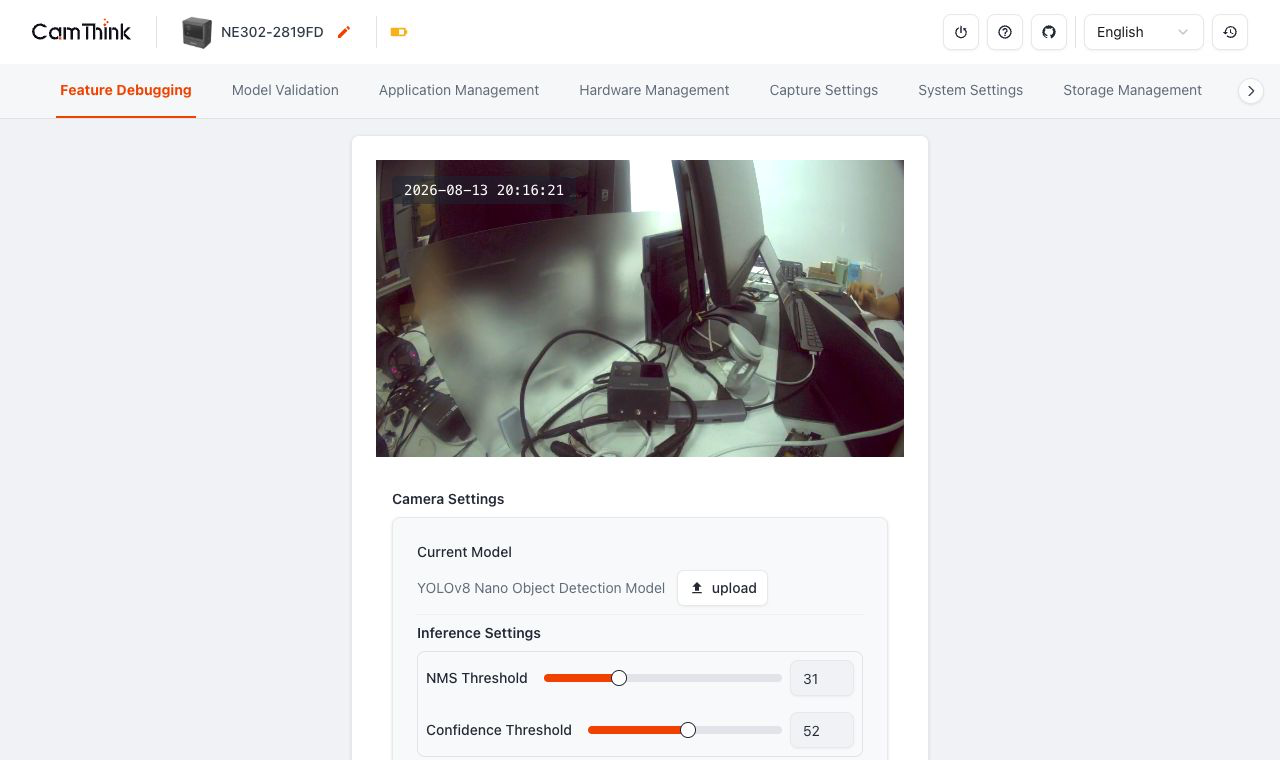
The Current Model area is the final handoff point for a packaged model. After the upload completes, reread the displayed model name before testing inference.
Validate in Two Stages Before Tuning the Scene
A successful build proves that the toolchain produced output. A successful upload proves that the device accepted a package. Neither result says whether the model sees the intended object. Use fixed-image validation first, then move to the live camera with the same model and thresholds.
Stage One: Use a Known Fixed Image
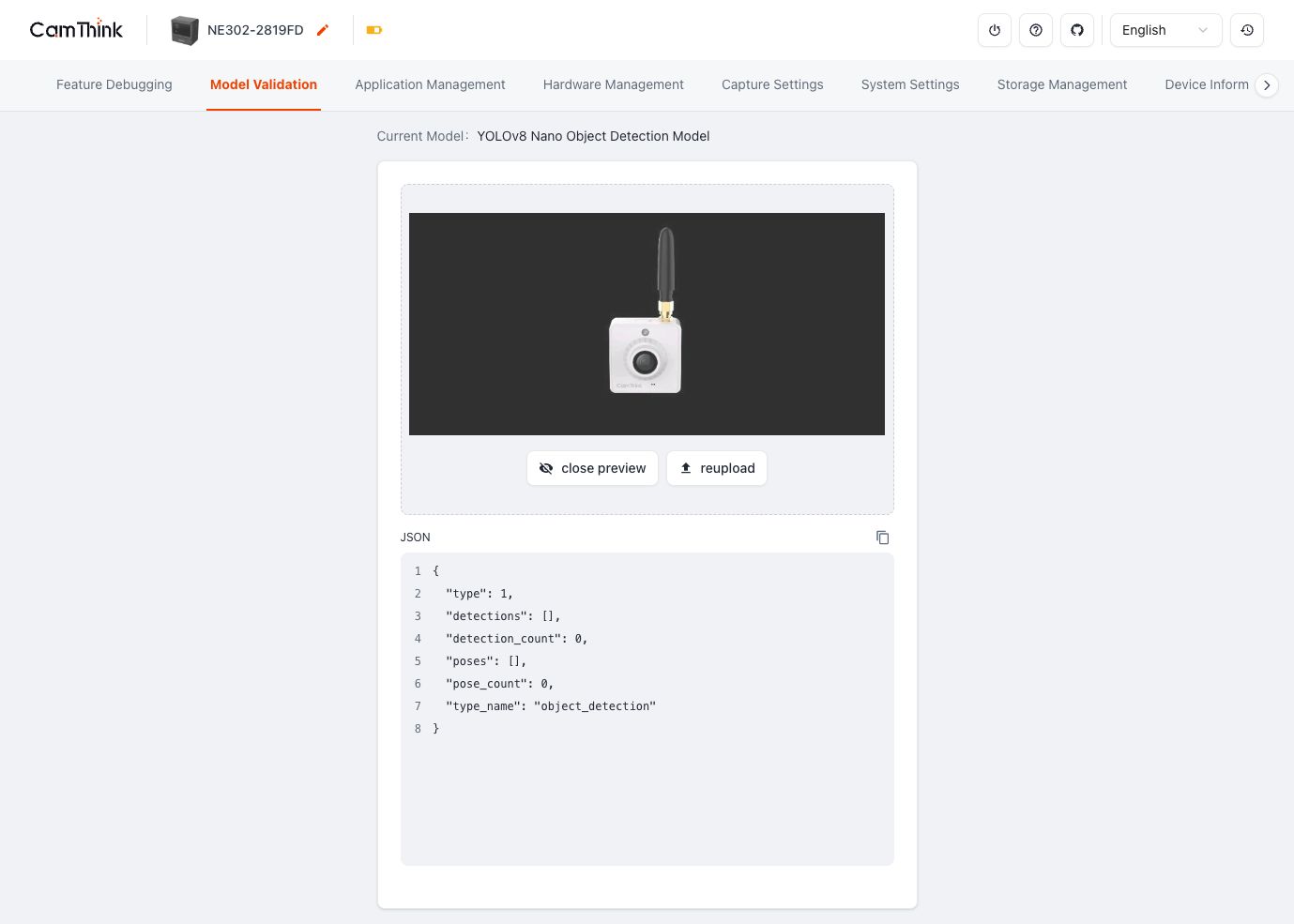
Open Model Validation and select a JPG, JPEG, PNG, or WebP image no larger than 10 MB. Choose an image that contains a clear target already detected by the quantized host model. The basic path passes when the page shows the intended current model, accepts the image, and updates the JSON result area.
An empty detections array means that the current image produced no detection at the current threshold. It does not, by itself, mean that the upload failed. Confirm the model name, use the same known-target image, and change only the confidence threshold or NMS threshold at one time. That makes each retest interpretable.
A fixed input removes lens placement and changing light from the first package test, so model and postprocessing issues are easier to isolate.
Stage Two: Use the Installed Camera
Next, capture an image through the camera pipeline without changing the model or thresholds. This introduces lens field of view, framing, focus, ISP settings, exposure, motion blur, distance, and scene lighting. Save the actual camera image alongside the fixed test image.
If fixed-image inference works and the camera result does not, inspect the captured pixels before rebuilding the model. Check whether the object occupies a similar portion of the frame, whether important detail survives resizing, and whether exposure or focus differs from the training data. Package changes cannot recover information missing from the image.
Follow the Full Camera-to-Result Data Flow
Model deployment is complete when the camera produces a result that the next part of the product can understand. Thinking in pipeline stages makes that goal much clearer than treating inference as a single black box.
NE302 camera-to-result path
4 MP image sensor
  -> ISP and image capture
  -> model-specific preprocessing, such as resize, color conversion, and normalization
  -> Neural-ART inference
  -> registered postprocessing and NMS
  -> structured result
  -> Web console or receiving application
The model contract covers the middle of this flow. The integration contract covers what leaves it. For an object detector, the receiving side usually needs a model identity, class identifier or name, confidence, bounding-box coordinates, and enough timing context to associate the result with a capture. The exact NE302 result fields and delivery methods depend on the current firmware, so use the device output as the schema source rather than inventing fields in an application first.
Coordinate conventions also need to be explicit. Decide whether boxes are pixels or normalized values, which corner starts the coordinate system, and whether the coordinates refer to the original 4 MP capture or the resized model input. A correctly detected object can still appear in the wrong location in a downstream interface when those assumptions differ.
Keep a redacted sample result with each approved model package. It gives firmware, ML, and application teams a shared artifact for testing even when they are not working with the same physical camera.
Diagnose Problems by Pipeline Stage
The quickest troubleshooting method is to identify the last stage that produced a trustworthy output. Avoid changing the model, JSON, firmware, image, and thresholds together. One controlled change is slower for a minute and much faster over an afternoon.
Observed symptom
Likely stage
Next useful check
ST Edge AI rejects the build
Model graph or toolchain
Read the first unsupported operator or conversion error; confirm the active ST Edge AI variant
Relocation fails or reports insufficient memory
Memory plan
Review the selected relocation profile, tensor sizes, and peak activation usage
Package uploads but Current Model does not change
Package or update path
Confirm the file is ne302_Model_xxx_pkg.bin, wait for validation and reload, then reread the model field
Fixed image returns an empty detection list
Threshold, input, or model quality
Use a known positive image, compare the host result, and lower one threshold for the same image
Labels or boxes are incorrect
JSON or postprocessing
Check class order, output dimensions, scale, zero point, box count, and coordinate convention
Fixed image works but live camera does not
Imaging and preprocessing
Save the camera frame and inspect focus, exposure, object size, crop, resize, and color handling
A package changes behavior after App firmware update
Runtime compatibility
Compare firmware, model package, parser revision, and STEDGEAI_VARIANT as one version set
The Web console’s thresholds are useful for diagnosis, but they do not replace a model-quality test. Once the chain works, return thresholds to the values chosen for the application and evaluate false positives and misses on a representative dataset.
Define a Deployment Pass Before Field Testing
A clear deployment pass keeps packaging work separate from application benchmarking. The following checks are enough to say that the custom model has crossed the deployment boundary:
The source model and JSON can rebuild a package with the same model identity and configuration when using the recorded toolchain and build command.
The device reports the intended model after upload or flashing.
A small set of known fixed images returns correctly decoded results, including at least one positive and one negative sample.
A camera-captured image produces a usable result under a stated lens, distance, lighting condition, and threshold.
The model package and App runtime use the same ST Edge AI variant.
The version record links the source model, quantization settings, JSON, package, firmware, hardware revision, and sample output.
After these checks pass, measure the things that decide product fit: task accuracy, end-to-end response time, memory headroom, power mode behavior, and stability across real scenes. Keep those results under a defined test method. A single successful detection is a deployment milestone, not a field-performance claim.
The repeatable path is straightforward: qualify the model, lock the tensor contract, build with the matching runtime, prove the package on fixed images, and only then introduce the camera scene. That sequence turns a vague "model does not work" report into a specific engineering question with evidence.
Frequently Asked Questions About NE302 Model Deployment
Can I upload an ONNX or TFLite model directly to NE302?
No. The device upload expects an NE302 model package such as ne302_Model_xxx_pkg.bin. The ONNX or TFLite file, matching JSON, relocation profile, and build system are inputs used to create that package.
Does every YOLOv8 or YOLO11 model work on NE302?
No blanket compatibility claim is appropriate. The repository verifies specific model and postprocessing paths. A custom export still has to pass operator analysis, tensor-contract checks, memory relocation, packaging, and device validation.
Do I need to retrain my model before deployment?
Not always. An existing model can be a candidate if its task, operators, input size, and output format fit the NE302 workflow. You may still need to export and quantize it. Retraining becomes useful when quantized accuracy, target-class coverage, or scene performance is not good enough.
Should I use a uint8 input with INT8 or float32 output?
The current repository recommends the UI path, uint8 input with INT8 output, for lower output memory and better performance. Use it only when the exported output tensor and registered postprocessor match. UF remains relevant for compatible models that produce float32 output.
When does a custom model need custom postprocessing?
Custom postprocessing is needed when the output layout or task cannot be decoded by an existing registered parser. That work belongs in the NE302 application, and it should be tested with saved tensors or fixed images before live-camera evaluation.
HH
Harry Hua
CamThink Technical Director
Harry works with edge vision hardware, embedded AI deployment, and camera-to-system integration at CamThink.