How to Test Existing CCTV Footage Before an Edge AI PoC
Validate existing CCTV footage by checking the target at the model's actual input size, collecting representative operating conditions, and testing against labeled events the model has not been tuned on. The result should tell you which camera views to reuse, which to adjust, and where a new point will improve the project.
Updated 11 min readNG4500By Harry Hua
In This Article
Start with the Decision Your Camera Must Support
A useful edge AI proof of concept begins with an observable output. For an entrance, that might be a count of people crossing a line in each direction. For a parking area, it might be the occupied state of each marked space. Both use cameras, but they need different views, labels, and evaluation methods. A detector drawing boxes around people or vehicles is only one part of either application.
Write a short task statement before exporting footage. Describe the target, the region where it matters, the event or state to report, and the action someone will take. For example: “Report a person entering this restricted zone after closing time, with a timestamp and a clip for operator review.” This gives the team a concrete event to label and a reason to inspect whether the full entry is visible.
Agree on difficult interpretations early. A person walking along a boundary, a vehicle covering two parking spaces, or a worker whose helmet is hidden by equipment should not silently become a positive or negative label. Define an uncertain category when the image cannot settle the question. This keeps an annotation disagreement from being mistaken for a model defect.
Use footage validation to decide whether the camera supplies enough information for that task. Hardware capacity is a separate decision once the input and application are understood. If the deployment architecture is still open, the guide to adding AI to existing CCTV systems explains where an edge box fits behind installed cameras.
Measure the Target After Resizing and Cropping
Inspect the image that reaches inference, alongside the original recording. A high-resolution CCTV stream can still produce a very small target after resizing. The useful measurement is the target's width and height at the model input, across the near, middle, and far parts of the operating zone.
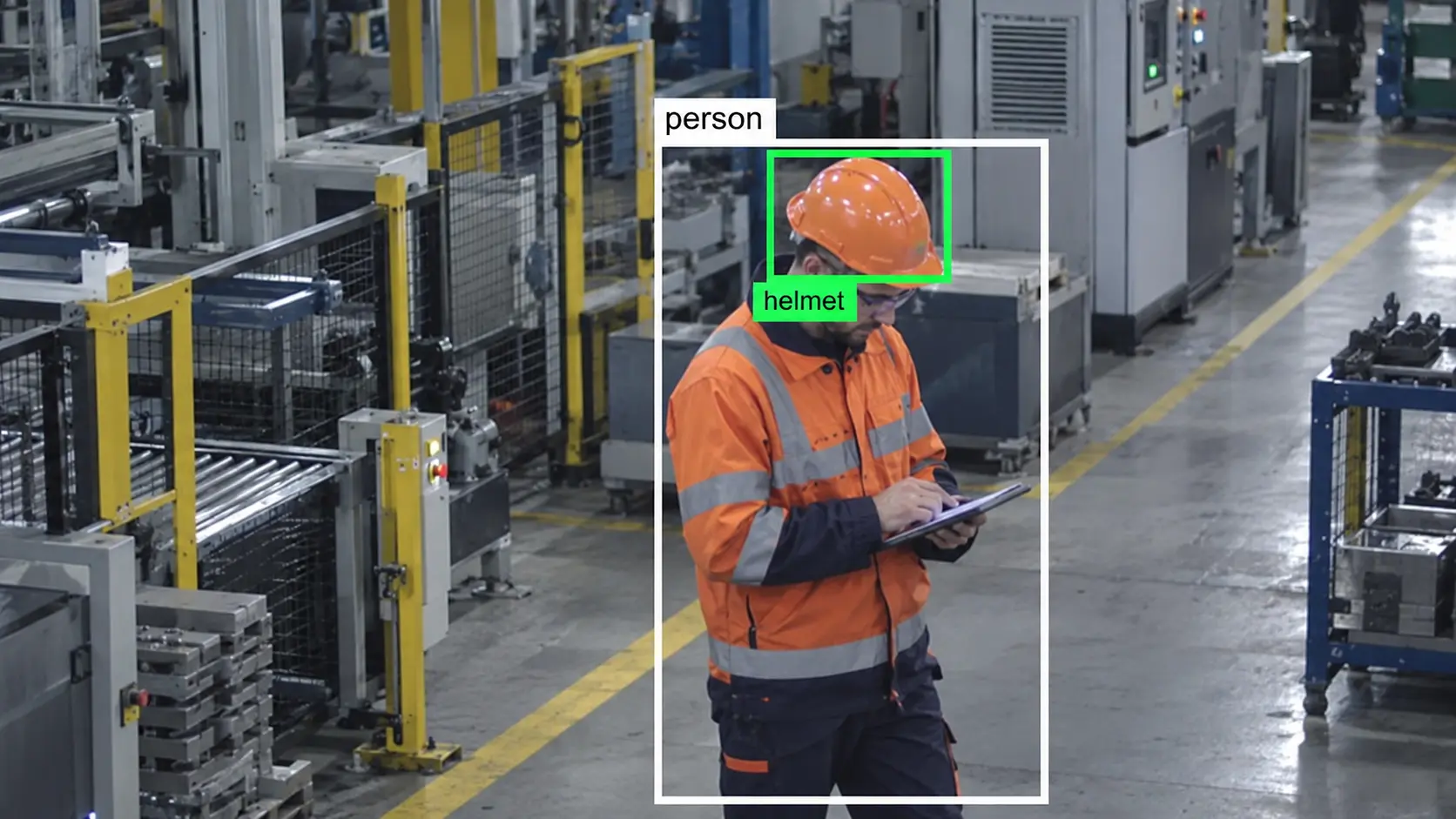
Consider a worked geometry example. A person is 180 pixels tall in a 1920 × 1080 frame. If that whole frame is reduced to 640 pixels wide while preserving its aspect ratio, the scale factor is 640 / 1920, or one third. The person becomes 60 pixels tall. A helmet that occupied 24 pixels vertically becomes 8 pixels. Padding that resized frame to a square input adds borders; it does not restore detail in the helmet.
This difference explains why a camera may support person detection while struggling with a small attribute on the same person. A region-of-interest crop can preserve more target detail at the same input size, but it also excludes context and may miss targets outside that crop. Compare both approaches using the full area the application needs to cover. NVIDIA's DeepStream inference documentation describes the aspect-ratio and padding controls that affect this transformation.
Time matters as well as spatial detail. As an illustrative sampling calculation, a target visible for 0.4 seconds offers roughly two sampling opportunities at 5 frames per second, before blur, occlusion, or dropped frames are considered. That may be a poor basis for a rule requiring several observations. Keep the event's approach and departure in the clip so that the team can evaluate the sequence, not just a favorable still frame.
When a required feature remains hidden, changing confidence thresholds will not make it visible. Adjust the view, lighting, or task definition before investing in a larger model.
Build a Sample Matrix Around Site Conditions
Choose samples by the conditions that change the application, rather than by recording duration alone. Several hours from an empty entrance can contain less useful evidence than a shorter collection with normal traffic, crowded arrivals, backlighting, and empty-scene intervals. Start with camera groups that share similar geometry and stream settings, then include exceptions that could change the reuse decision.
The following matrix is a collection plan, not a prescribed dataset size. Replace its examples with conditions from the site. For each cell, record which cameras and independent events are covered; an empty cell is a visible gap in the PoC's scope.
Sample Group
What to Collect
Decision It Supports
Routine operation
Common targets, typical traffic, normal illumination, near and far positions
Whether the intended task works in everyday use
Difficult visibility
Night mode, glare, shadows, motion blur, partial occlusion, crowded views
Whether a view or capture setting needs adjustment
Negative and confusing scenes
Empty zones, reflections, posters, parked objects, similar clothing or shapes
Whether the application creates avoidable operator alerts
Transitions
Lights switching, day/night changes, a space becoming occupied or empty
Whether the state or event is interpreted correctly over time
Record continuous quiet intervals as well as event clips. A collection containing only positive examples cannot reveal the false-alert workload operators will face. Keep naturally occurring difficult examples even when they make a demonstration less impressive; they tell the team where to spend engineering effort.
There is no fixed number of minutes that makes a CCTV dataset representative. Add footage until the important conditions contain enough independent examples to support the intended decision. If a rare condition has not occurred, identify it as untested and limit the pilot accordingly. A daytime-only first phase can be a useful, deliberate scope; calling it evidence for overnight operation would change the claim.
Preserve Original Video and Keep Test Events Separate
Retain a copy of the closest available source to the stream the edge box will consume. An NVR or VMS export can be useful, but its export settings may change resolution, compression, or timing. Store the original separately from any resized, cropped, annotated, or privacy-processed working copy. Each transformation should be traceable so that a later result can be reproduced.
A lightweight manifest is enough for an initial review. Give each clip a stable identifier and record its camera, capture time and timezone, condition group, codec, resolution, frame rate, and export method. Add the relevant zone definition, expected event timestamps, and any uncertain labels. Keep camera credentials outside this manifest. The objective is to connect a result to the input that produced it without building an elaborate data platform.
Split footage at the event or recording-session level when developing and evaluating a model. Randomly dividing neighboring frames can put nearly identical views of the same event into both training and testing. A model then appears to generalize while being evaluated on something very close to what it has already seen. Reserve separate sessions or days for a final test. If the claim includes transfer to new sites, reserve cameras or sites too.
Use development footage to select thresholds and improve rules. Once those choices are fixed, run the reserved test set and report it separately. If you tune again after examining a test failure, that set has become development evidence; collect a fresh holdout before making a new generalization claim. This separation is especially useful in CCTV, where thousands of frames may represent only a handful of independent events.
Evaluate Events and Operator Workload, Not Just Boxes
Report results in the units the application uses. Object-detection precision, recall, and mean average precision help compare model predictions; the Ultralytics validation guide explains those outputs for YOLO detection models. A deployment decision also needs event-level measurements, because one person appearing in many frames should not automatically create many alarms.
For an alerting application, define how a predicted alert matches a labeled event, including the relevant zone and timing tolerance. Then measure the proportion of expected events detected and the number of false alerts over monitored time. Count duplicate alerts separately so that good detection does not conceal a noisy operator workflow. For occupancy, assess the reported state and the delay in recognizing a change. For counting, compare counts over the actual reporting interval.
Illustrative Test Subset
Labeled Events
Events Detected
Event Recall
Daytime
90
87
96.7%
Night
10
5
50.0%
Combined
100
92
92.0%
These invented numbers illustrate reporting, not CamThink test results. The combined score looks much stronger than the night result because the dataset contains many more daytime events. Show the counts and scores for each important condition, then use the expected operating mix to interpret their business impact. Ten night events offer limited evidence, so a decision about overnight deployment should include further night sampling.
False-alert rates also need a denominator. In a separate arithmetic example, six false alerts across twelve camera-hours equal 0.5 false alerts per camera-hour. A camera-hour is one monitored camera for one hour. Report the actual monitored duration, the camera mix, and any unavailable periods, rather than inferring this rate from a set of short positive-event clips.
Set acceptance targets with the people who will use the output before running the final test. A low-consequence occupancy dashboard and a restricted-zone alert require different tradeoffs. The useful result is a documented choice about misses, review effort, and response delay, with examples that explain the remaining errors.
Use NG4500 to Carry the Test into a Live Pilot
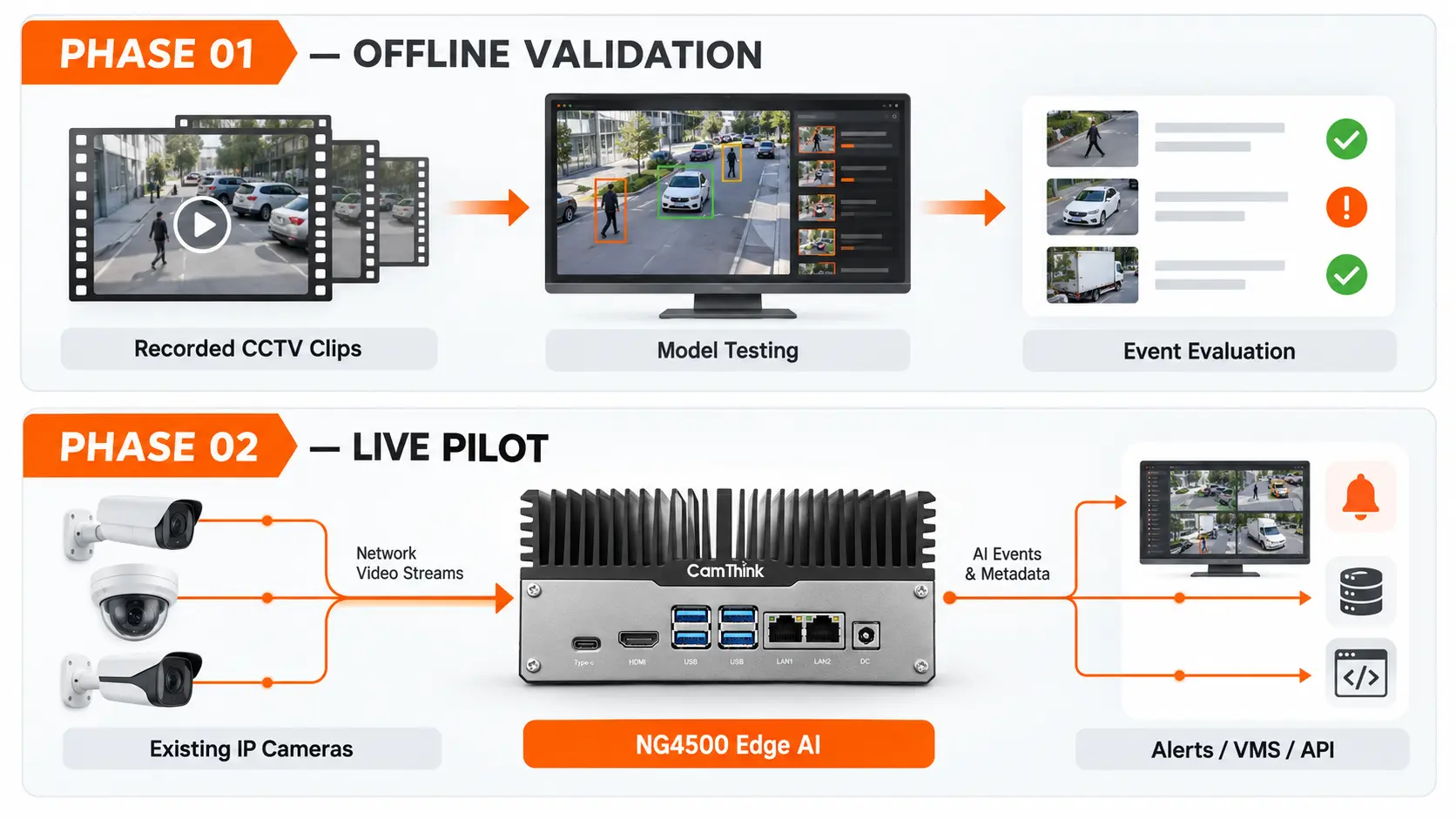
NeoEdge NG4500 gives teams a Jetson Orin Nano/NX platform for developing local video analytics behind existing IP cameras. CamThink's DeepStream guide for NG4500 covers local video and RTSP inputs, inference, tracking, and custom-model integration. That provides a practical route from repeatable clip evaluation to a connected camera pilot.
Use the standard platform as an evaluation starting point; when the site needs a different hardware or integration configuration, assess that configuration with CamThink against the intended deployment. This keeps the first test accessible while leaving room for the application's actual installation requirements.
An effective handoff has a clear sequence:
Establish the baseline on saved footage, preserving the model version, preprocessing choices, labels, and event rules.
Run the deployment model and its preprocessing on the target NG4500 configuration. Check for changes introduced by conversion or runtime settings.
Connect representative live streams and exercise the same application logic, including its event output and evidence clips.
Expand to the planned concurrent workload and measure responsiveness and sustained operation using the separate sizing process.
The connection between these stages is reproducibility. When a live result changes, the saved inputs and settings help isolate whether the cause is the model, capture conditions, or execution path. Recorded clips make comparisons repeatable; live streams expose timing and behavior that an offline replay does not reproduce.
For configuration selection, continue with how to size an edge AI box for multiple CCTV cameras. Camera capacity depends on the complete workload, so it should be measured after the task and usable input are established.
Turn the Findings into a Camera Reuse Decision
End the review with a decision for each camera group and an explanation of what drove it. This is where footage validation creates value: it directs changes toward the actual bottleneck and helps preserve installed cameras that already capture the required evidence.
Finding
Recommended Next Step
Evidence to Recheck
Targets remain visible and event results meet the agreed pilot targets
Reuse the view and advance to the live pilot
The deployment runtime and live event path
Detail exists in the source but is lost during export or preprocessing
Correct the stream selection, export, crop, or resize path
The same reserved events under the revised input path
A lighting, focus, or mounting change can expose the required feature
Adjust the capture setup and collect new samples
The conditions that originally caused the problem
The required feature is persistently hidden or outside useful coverage
Add or reposition a camera point, or narrow the task
The new geometry and the intended operating zone
Distinguish an input problem from a model problem. If reviewers can consistently label the relevant feature at the actual model input but the detector misses it, investigate model coverage and thresholds. If the feature is invisible even to the reviewers, gathering more labels from that same view is unlikely to resolve the basic information gap. A testable capture change is the more productive next step.
Summarize the chosen action, the covered conditions, and the remaining pilot question in a short decision record. A useful conclusion might be: “Reuse the entrance view for daytime counting; improve backlit capture before including the afternoon peak.” It explains what can proceed and what evidence will expand the scope.
If the choice between reusing a view and changing the capture setup is still unclear, discuss the camera reuse path with CamThink. Start with the intended application and a representative view so the conversation can focus on the next useful test.
Resolve Common Footage Collection Questions
Can Screenshots Replace Video in a First Review?
Screenshots are useful for inspecting field of view, target size, and obvious visibility problems. Include a frame at the intended model input size as well as the original. For crossing, dwell, counting, or occupancy transitions, video is needed to inspect timing, occlusion, and repeated observations. A still image cannot show whether the event rule works across a sequence.
What If Only VMS-Exported Clips Are Available?
Use them to begin the scene and model review, and document the export method. Keep any available stream settings with the files. Before advancing the pilot, compare the exported images with the stream the edge device will receive so that a favorable export does not silently become the basis for a different live input.
Can Synthetic or Public Footage Fill Missing Conditions?
It can help explore model behavior and create development hypotheses. Keep those results separate from site acceptance evidence. A public night scene or synthetic crowd does not establish performance for a particular camera, lens, illumination pattern, and operating zone. Collect the missing site condition before extending the deployment claim to it.
HH
Technical Director at CamThink
Harry Hua
Harry works on edge AI camera platforms, video analytics deployment, and the integration of embedded vision systems with operational workflows.
Bring your application goal and a representative camera view. CamThink can help you discuss the NG4500 evaluation platform and the integration path for your pilot.