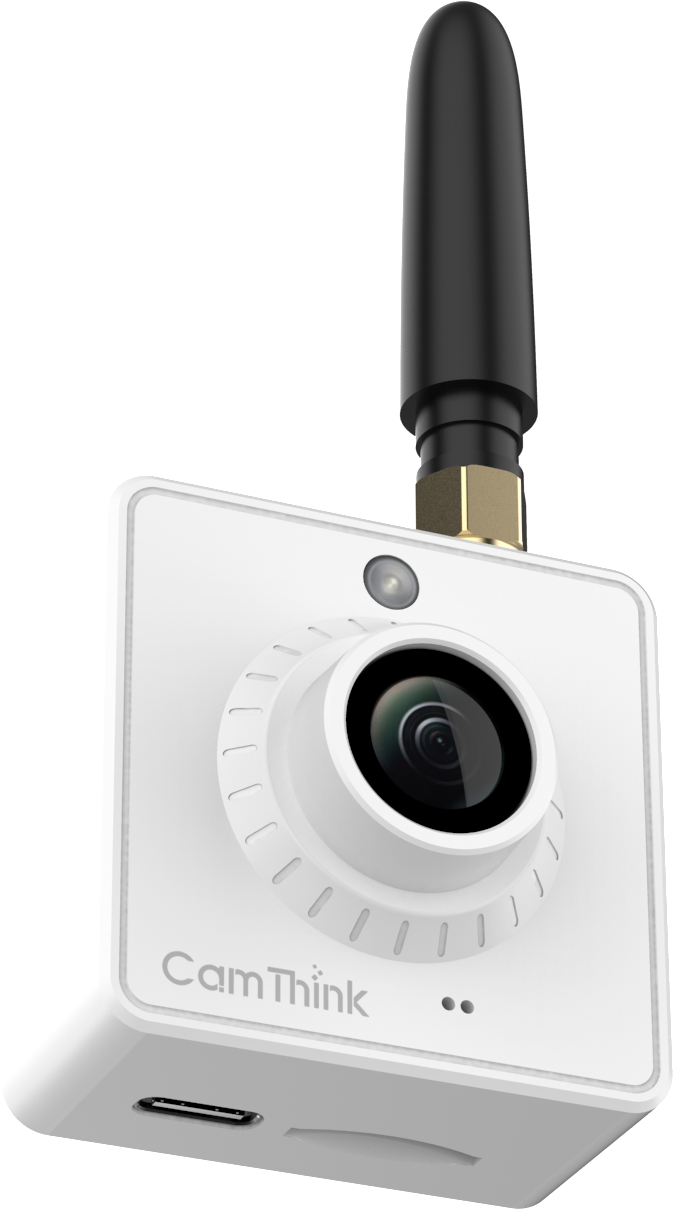
Underground Meter Reading: 4G LTE vs Wi-Fi HaLow for the NE101
Basement utility pits and underground meter vaults are notoriously hostile to standard Wi-Fi. This guide compares
the two wireless alternatives available on the NeoEyes NE101 — LTE Cat.1 and Wi-Fi HaLow (802.11ah) —
across the dimensions that actually matter for field deployment: signal penetration, power draw, SIM costs,
and infrastructure requirements. Includes a decision matrix and step-by-step configuration walkthrough.
The Real Problem: Why Standard Wi-Fi Fails Underground
Standard 2.4 GHz Wi-Fi lost 15–28 dB of signal strength through a 250 mm concrete wall — enough for a 20 dB loss to turn a –60 dBm signal into –80 dBm at the meter.
Add a cast-iron pit cover, a steel meter cabinet, and earth fill, and the remaining link margin can disappear.
Actual loss depends on the structure and the radio path, so test the link at the installed camera with the cover closed.
This isn’t an edge case. A significant share of commercial water and gas metering infrastructure — sub-metering
in basements, district heating meters in plant rooms, industrial flow meters in concrete trenches — sits in
exactly this environment. Two NE101 connectivity options to evaluate here are cellular (4G LTE Cat.1)
and sub-GHz Wi-Fi (Wi-Fi HaLow, 802.11ah). Both are available as plug-in communication modules for the
NeoEyes NE101 camera. Which one you pick has real consequences for power consumption,
recurring cost, and infrastructure complexity.
Architecture Scope
This guide covers the NE101 as the image capture node. OCR digit recognition runs separately in
NeoMind on a local NeoEdge NG4500
or a suitable PC/Linux host. For the complete system architecture and OCR deployment path,
see the IoT Camera Meter Reading
guide.
NE101 Communication Modules: What You Are Actually Getting
Both modules slot into the same physical header on the NE101 mainboard — no soldering, no firmware
changes, driver-free recognition on insertion. Swapping protocols in the field means opening the enclosure,
removing screws, and exchanging the module. That’s the hardware reality to keep in mind when reading
the comparison below.
LTE Cat.1 Module
The global LTE Cat.1 module uses a Quectel EG912UGL chipset with LTE FDD/TDD and GSM support;
the North America version uses Quectel EG915Q-NA with regional LTE bands.
Two regional variants are available: global version (NE101-L01GL) for Europe, Asia, South America, and Oceania,
and a North America version for NA markets. Same 60 mm × 60 mm form factor. Requires a nano-SIM card
inserted into the slot behind the front cover.
Module
EG912UGL (global) / EG915Q-NA (North America)
Protocol
Global: LTE FDD/TDD + GSM; NA: LTE FDD
NE101-L01GL (Excl.NA)
Europe, Asia, South America, Oceania
North America Cat.1 variant
North America
SIM
Nano SIM (user-supplied)
Form Factor
60 mm × 60 mm
Wi-Fi HaLow Module
The Wi-Fi HaLow module uses a Quectel FGH100M chipset, compliant with IEEE 802.11ah.
It operates in the sub-GHz ISM band: 868 MHz for Europe, 915 MHz for North
America. Same 60 mm × 60 mm form factor. No SIM card — it connects to a private Wi-Fi HaLow
access point (AP) on your local network. Two SKUs are available: 868 MHz and
915 MHz.
Module
Quectel FGH100M
Standard
IEEE 802.11ah
EU Frequency
868 MHz (NE101-HL00)
NA Frequency
915 MHz (NE101-HL01)
Infrastructure
Requires HaLow AP
Recurring Cost
None (private network)
Head-to-Head Comparison
The table below covers the dimensions that matter most for underground meter deployments. “Winner” calls
are contextual — there is no universally superior option; the right choice depends on your specific
constraints.
Dimension
LTE Cat.1
Wi-Fi HaLow (802.11ah)
Signal penetration
Uses existing cellular tower infrastructure. A nearby tower is an advantage, but the LTE link still needs to work inside the closed pit or cabinet.
Sub-GHz can penetrate obstacles better than 2.4 GHz Wi-Fi. The advantage depends on the concrete, metalwork, and AP placement; test the link at the meter.
Effective range
Determined by carrier coverage and the installation geometry, not a fixed distance to the tower. Confirm with an image upload from the meter.
Up to ~1 km outdoor LOS. Indoor/underground range is highly site-dependent — survey the farthest and most obstructed meters with the intended AP.
Power draw (active TX)
Higher peak current during LTE transmission. Connection time and retries can make a weak-signal upload a significant part of the battery budget.
A nearby AP can shorten the upload window. Compare energy per completed capture and upload, not transmit current alone.
Power draw (deep sleep)
Both paths: the NE101 sleeps between captures. Radio choice matters most during connection and image upload; calculate lifetime for the actual capture schedule.
Recurring cost
SIM data plan required. Typical IoT SIM: $0.50–$5/device/month depending on region and data volume. At 1000 units: $500–$5,000/month ongoing.
No recurring cost. Private network — one-time AP hardware investment only.
Infrastructure required
None on your side — cellular tower coverage already exists. SIM procurement and APN configuration only.
Requires a Wi-Fi HaLow AP per coverage zone. AP hardware cost typically $150–$500. Must be installed with power and backhaul.
Data privacy
Images transit cellular network and operator infrastructure. For sensitive industrial data, end-to-end encryption (MQTTS) is essential.
Traffic can stay on a private network when the AP, gateway, and broker are on-site and no cloud forwarding is configured.
Configuration
Set APN, username, password via Web UI. Region-specific SIM matching required. Cat.1 configuration takes ~5 minutes in the NE101 Web UI.
Scan for HaLow SSID in Web UI, select region (EU/NA), connect. No APN configuration. Slightly simpler setup when AP is already deployed.
Works without local infrastructure
Yes — where usable cellular coverage reaches the meter, including remote sites with no buildings or private network nearby.
No — requires a local HaLow AP within range. Remote/isolated sites are not viable without deploying AP infrastructure.
Deployment scale economics
Cost-effective at low count. Becomes expensive at scale due to recurring SIM costs. 100 units × $2/mo = $2,400/yr ongoing.
Cost-effective at scale. One AP can serve 50–100+ NE101 units. Per-unit recurring cost is zero beyond amortized AP hardware.
Typical use case fit
Remote rural meters, outdoor utility cabinets, geographically dispersed sites, sites with no local infrastructure.
Dense urban sub-meter deployments, building basement meters, campus utility networks, 50+ units on one site.
Source: CamThink product specifications and field deployment data. LTE costs are estimates; actual SIM pricing varies by carrier and region.
The NE101 ships with Wi-Fi standard. Both LTE Cat.1 and Wi-Fi HaLow are plug-in modules — order the version that matches your deployment or buy modules separately.
The two questions that determine the right choice in almost every deployment:
(1) Is there cellular coverage at the installation site? (2) How many meters are on the same site?
LTE Cat.1
Choose LTE when:
Cellular coverage is available
Fewer than ~30 meters per site (SIM cost manageable)
No local network infrastructure
Sites are remote or geographically dispersed
Fast deployment required (no AP setup)
Moderate data sensitivity (MQTTS acceptable)
Wi-Fi HaLow
Choose HaLow when:
50+ meters per site (AP amortized quickly)
No cellular signal (or weak underground)
On-prem data path required, with a local gateway and broker
Long-term deployment (no SIM cost)
Local network/backhaul available
Dense building or campus sites
The 50-Unit Threshold
At $2/unit/month SIM cost, 50 units costs $1,200/year in data recurring. A single HaLow AP capable
of serving those 50 units costs roughly $200–$400 one-time. The crossover point where HaLow becomes
cheaper than LTE is typically 15–25 units over a 12-month horizon, depending on SIM pricing in
your region.
Step-by-Step Configuration
Both modules are configured via the NE101’s built-in Web UI. After installing the module and powering
on, access the Web UI at 192.168.1.1 by connecting to the NE101’s Wi-Fi AP
(SSID: NE101_XXXXXX, no password).
Configuring LTE Cat.1
1
Install SIM card
Open the NE101 front cover with a Phillips screwdriver. Insert your nano SIM into the slot. Reinstall the cover.
2
Open Cellular configuration in Web UI
Navigate to Internet Connection → Cat.1. You’ll see fields for APN, Username, Password, PIN Code, Authentication Type, and AT Commands.
3
Enter APN credentials
Enter the APN provided by your carrier (e.g., internet, iot.1nce.net, or your private APN). Username and password may be blank for many IoT SIMs. Click Send to test.
4
Verify cellular status
Cellular Status changes to Connected when the link is live. Click Details to confirm signal strength and IP address. Click Save.
5
Configure MQTT data reporting
Navigate to Data Reporting. Set your MQTT broker host, port (default 1883, or 8883 for MQTTS), topic, and credentials. Enable SSL/TLS and upload CA certificate for encrypted transmission over cellular.
Configuring Wi-Fi HaLow
📚 Complete Wi-Fi HaLow Deployment Guide
This section covers the quick-start configuration. For comprehensive deployment guidance —
including AP selection, network topology planning, signal optimization, and troubleshooting —
see the full
Wi-Fi HaLow Solution Application Guide
1
Install HaLow AP on-site
Position the HaLow AP with clear line-of-sight to the meter area if possible. Connect it to your LAN with power. Note the AP SSID and credentials.
2
Open Wi-Fi HaLow configuration in Web UI
Navigate to Internet Connection → Wi-Fi HaLow. Select your region from the dropdown — Europe (868 MHz) or North America (915 MHz). This sets the frequency band automatically.
3
Scan and connect
Click Refresh to scan available HaLow SSIDs. Select your AP SSID from the list and enter the password. The NE101 will connect and display signal strength (RSSI).
4
Configure MQTT data reporting
Same as LTE: set MQTT broker address on your local network, port, topic, and credentials. Since traffic stays on-premises, plain MQTT on 1883 is acceptable for closed networks; use MQTTS for any internet-facing broker.
MQTT Payload Reference
Once connected — via either LTE or HaLow — the NE101 publishes an identical JSON payload after each
capture event. The payload includes device identity, battery state, capture type, and the Base64-encoded
JPEG image. Your OCR pipeline, SCADA system, or data broker subscribes to the configured topic and
receives this message directly, with no intermediary cloud service required.
📡 MQTT Data Integration
For detailed MQTT broker configuration, topic subscription, and data pipeline integration,
see the complete
MQTT Data Integration Guide
in the Wiki documentation.
MQTT Payload — NE101 (JSON, identical for LTE and HaLow)
The snapType field tells your downstream system what triggered the capture:
Scheduled for time-based reads, PIR for motion-triggered events,
Button for manual test captures. For meter reading workflows, Scheduled
is the typical operating mode — configure a read interval in the Capture Settings
section of the Web UI (up to 8 scheduled times per day, or interval-based in minutes/hours/days).
Battery Life Impact
The NE101 sleeps between scheduled captures; the difference between LTE and HaLow appears mainly during
the active transmission window of each capture event. The product overview quotes
0.8 W standby for a PIR/radar outdoor-monitoring example. That figure alone does not
predict battery life for a meter reader with a different capture and upload schedule.
LTE Cat.1 has a higher peak TX current than HaLow, particularly on weak-signal sites where the modem
boosts transmit power to maintain the cellular link. In underground pits with marginal LTE signal,
this can meaningfully reduce battery life compared to a HaLow deployment with a nearby AP.
On a reliable LTE link, a shorter connection and upload time can narrow that gap.
The CamThink Battery Life Calculator
lets you model expected battery life for your capture frequency, battery type, and Wi-Fi or Cat.1 mode before
purchasing. For a 4× capture per day schedule in Wi-Fi mode, its NE101 model estimates 3+ years
on 4× AA batteries. Actual life depends on signal quality, temperature, and battery condition. For HaLow,
measure the capture-and-upload cycle on-site; the calculator currently models Wi-Fi and Cat.1.
Summary: One Deployment, One Decision
If you leave with one rule: use LTE for scattered remote sites; use HaLow for dense
concentrated deployments. Both modules are physically interchangeable on the NE101, so
you can re-evaluate without replacing hardware — just swap the module and update the Web UI
configuration. For large-scale projects, a staged pilot comparing both protocols on representative
sites is worth the investment before committing to a module SKU for the full deployment.
Frequently Asked Questions
Can I switch from LTE to HaLow without replacing the NE101 camera unit?
Yes. The communication module is a physically separate plug-in board inside the NE101 enclosure.
Opening the front cover (Phillips screwdriver), removing the current module, and inserting the
HaLow module takes about 2–3 minutes per unit. No firmware changes are required — the NE101 auto-detects
the fitted module on boot. You’ll need to reconfigure the Internet Connection settings in the Web UI
after the swap.
Does Wi-Fi HaLow require a specific access point, or does it work with any router?
Wi-Fi HaLow (802.11ah) is not compatible with standard Wi-Fi routers. You need a dedicated
802.11ah access point operating in the sub-GHz band (868 MHz for Europe, 915 MHz for North America).
HaLow APs are a separate hardware category from standard Wi-Fi routers. The NE101-HL00 (EU)
and NE101-HL01 (NA) modules each operate at their respective regional frequency. Make sure your
AP and NE101 module match the same regional variant.
What APN settings should I use for common IoT SIM cards?
Common IoT SIM APN settings: 1NCE (iot.1nce.net, no auth), Hologram
(hologram, no auth), Twilio Super SIM (super, no auth),
Vodafone IoT (m2m.vodafone.com), Emnify (em). For your specific
carrier, the APN string is provided in the SIM activation documentation. Configure this in
the NE101 Web UI under Internet Connection → Cat.1 → APN.
Can the NE101 use MQTTS (encrypted MQTT) over both LTE and HaLow?
Yes. MQTTS (MQTT over TLS, port 8883) is supported on both connection types. Enable the SSL
toggle in Data Reporting, then upload your CA certificate and optionally client
certificate and private key. For LTE deployments where images transit the cellular network,
enabling MQTTS is strongly recommended. For private HaLow networks with no internet exposure,
standard MQTT on port 1883 is acceptable for most use cases.
My underground pit has no cellular signal at all. What are my options?
Three paths: (1) Wi-Fi HaLow — deploy a HaLow AP above ground with the antenna
pointed toward the pit area, then test the link from inside the closed pit;
(2) External antenna — if a usable cellular signal exists above the pit, review an
external antenna and sealed feedthrough with CamThink rather than assuming a fixed gain;
(3) Local storage — the NE101’s Micro TF card slot supports local image storage;
retrieval or later upload depends on the configured workflow. Contact CamThink to
discuss which path fits your specific site geometry.
Is there a multi-SIM or SIM-redundancy option for critical monitoring sites?
The current NE101 Cat.1 module supports a single nano SIM. For carrier redundancy on
critical sites, consider eUICC/eSIM-capable SIM cards that support automatic network
roaming between carriers on a single physical SIM — services like 1NCE, Eseye, or BSIM100
offer this for industrial IoT deployments. Multi-modem failover (LTE primary, HaLow
backup) is architecturally possible but requires two NE101 units per site.
Does CamThink offer the NE101 with both modules pre-installed for testing?
The NE101 ships with one communication module per unit (Wi-Fi standard, Cat.1 or HaLow as
optional add-ons). For PoC evaluations comparing both protocols, we recommend purchasing
one unit of each variant — NE101-L01GL (Cat.1 global) and NE101-HL00 (HaLow EU) or
NE101-HL01 (HaLow NA). Contact us at
sales@camthink.ai
to discuss evaluation kit options.
Harry has 10+ years of experience in IoT hardware development and deployment. He currently leads
the technical team at CamThink, specializing in edge AI cameras, wireless connectivity solutions,
and large-scale meter reading infrastructure. This article draws on his field experience deploying
LTE and Wi-Fi HaLow solutions for underground utility monitoring across Europe and North America.
The NE101 is available with Wi-Fi, LTE Cat.1, or Wi-Fi HaLow communication.
Tell us your deployment scale and site conditions — we’ll help you pick the right module
and integration path.